By Jay Jung
Reviewed 23 September 2026
This guide is for incident response and recovery after suspicious smart-home activity. It is not a preventive setup guide. It contains no affiliate links, does not endorse any product or provider, and cannot guarantee that a device, account or network is clean. If you are unsure, seek qualified technical help.
Start with the signs, then triage the risk
A light turning on unexpectedly, a camera changing direction or a smart speaker behaving oddly can be alarming, but one unexplained event does not identify the cause. A schedule, automation, household member, service fault or accidental command may resemble unauthorised access. Treat the event seriously without assuming that every connected device has been compromised.
Look for a pattern. Account-compromise warning signs include activity you do not recognise, password-reset messages you did not request, unexpected logouts, and login records showing an unfamiliar location or device. In a smart home, related observations may include settings you did not change, unknown household members or linked accounts, unexplained remote-access changes, or repeated behaviour after an automation has been ruled out.
Prioritise safety before diagnosis. If a connected lock, alarm, garage door, camera or other device is creating an immediate physical risk, move people to safety and use a safe alternative where possible. For an immediate risk to life or harm, call 000. Do not spend time trying to prove exactly how access occurred before addressing urgent danger.
For broader household security context, see smart-device security guide. The steps below focus narrowly on containment, account recovery, evidence preservation and decisions about affected equipment.
Is it the account, one device, or the router?
Separating the likely control point helps you avoid unnecessary resets and directs your first recovery action.
- Suspect an account issue when the service shows unfamiliar sign-ins, password or recovery changes, unknown multi-factor authentication methods, unexpected logouts, or activity across several products connected to the same account. Start recovery from a clean device.
- Suspect a device issue when one camera, hub, speaker, plug or appliance behaves abnormally while the service account and other devices appear unaffected. Isolate that product where it is safe to do so, then check its update and support status.
- Suspect a router or network issue when several unrelated devices develop problems together, router administration settings have changed, or the router is running outdated firmware. The router is the gateway between the household network and the internet, so it deserves its own checks.
These categories can overlap. An intruder using a stolen cloud-account password may control a physically healthy device. Malware on a phone or computer may expose credentials for several services. A router problem may affect multiple connected products without proving that each product itself was altered. Keep your conclusions provisional while you collect evidence and recover the most important accounts.
Preserve useful evidence before changing things
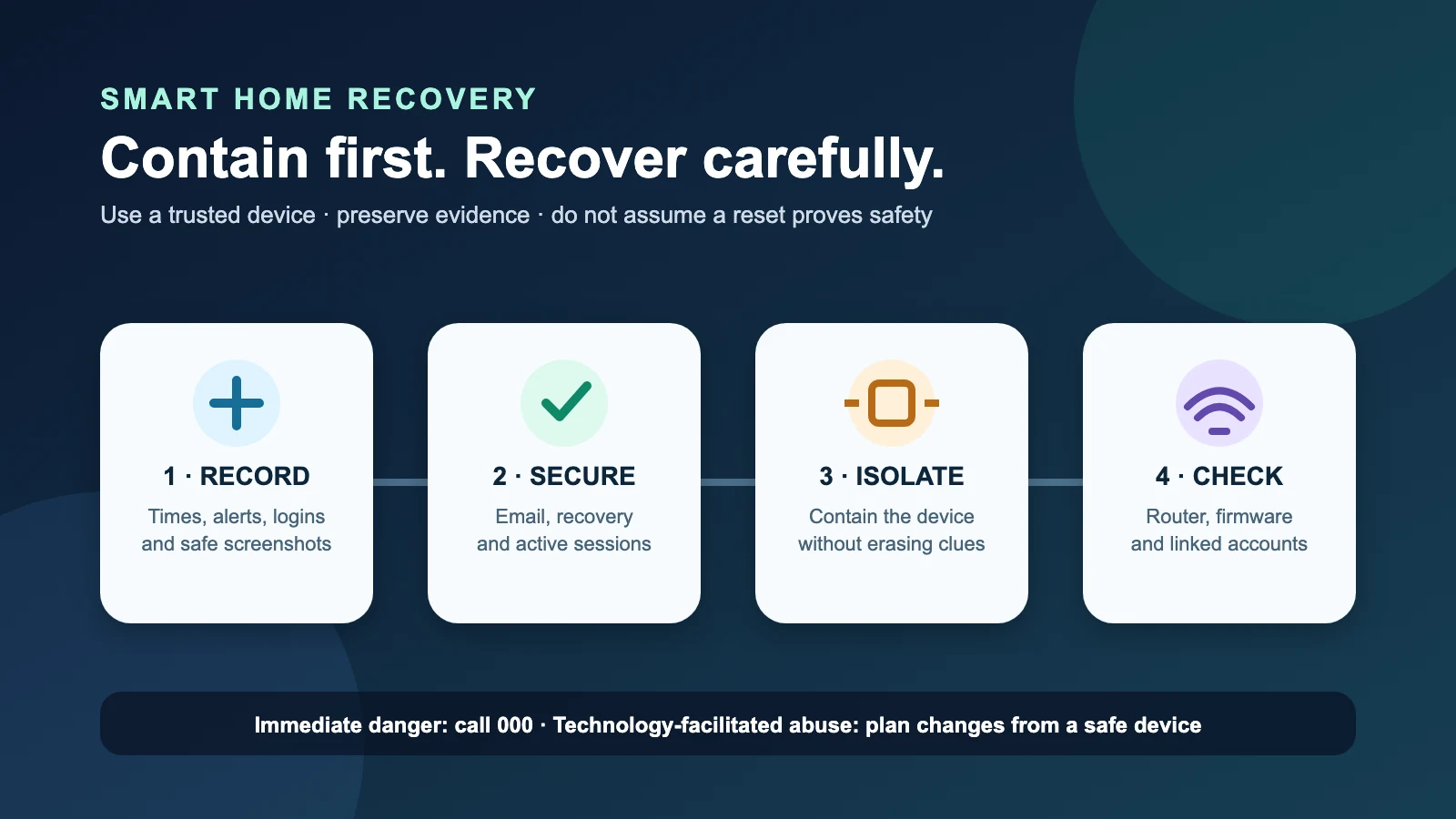
Make a short incident record if it is safe. Note the date and time, what happened, which device or account was involved, who was present, and what the app or service displayed. Capture screenshots of unfamiliar sign-ins, reset notices, unknown users, changed recovery details and relevant device events. Preserve original emails or messages rather than copying only part of their text.
Record actions as you take them: when you disconnected a device, changed a password, signed out sessions, updated firmware, contacted a provider or made a report. This creates a clearer timeline if you later need technical assistance or must explain the incident to a service, bank or reporting body.
Do not collect evidence in a way that increases danger. This is especially important where a current or former partner, family member or another known person may be using technology to monitor or control someone. In that situation, abrupt password changes, disconnections or resets may be noticed and could escalate the risk. Use the safety guidance later in this article before making visible changes.
Secure important accounts from a clean device
Do not enter passwords, recovery codes or financial details on a phone or computer that may contain malware. Use a trusted, up-to-date device that is not showing suspicious behaviour. If you cannot identify a suitable device, obtain professional assistance rather than repeatedly entering secrets into the suspected device.
Begin with the accounts that can unlock other accounts: your primary email, smart-home platform account and any account used for password recovery. Change each affected password to a new, unique password that is not reused elsewhere. Verify that the recovery email address and phone number are yours. Review multi-factor authentication methods and remove any you do not recognise. Then use the service’s option to log out other devices or sessions, if available.
Check linked services and any other account where the old password was reused. Reuse can turn one exposed credential into several account compromises. Review recent activity and connected users rather than assuming that a successful password change resolved everything.
If a service supports a stronger sign-in option, consider it during recovery after you have regained control and verified recovery details. See passkey guide for separate guidance on passkeys and sign-in choices. Do not let that optional improvement delay removal of unknown access or recovery of your email account.
Recover the smart-home account methodically
- Use the provider’s official app or type its known address directly instead of following an unexpected message link.
- Change the password from the clean device and ensure it is unique.
- Confirm the recovery email address, phone number and other recovery options.
- Review signed-in devices or sessions and log out all other devices where the service offers that control.
- Remove unknown multi-factor authentication methods, household members, delegated users and linked accounts.
- Inspect recent account activity and record anything you do not recognise.
- Check other accounts linked to the same email or exposed through a reused password.
If you cannot sign in, use the provider’s official account-recovery process. Keep records of recovery messages and support contacts. A returned login is encouraging, but it does not by itself establish that every linked device, phone, computer or network component is safe.
Isolate, update and assess individual devices
If one smart-home product remains suspicious, isolate it where doing so is safe. Depending on the product, that may mean disabling remote access through its official settings, disconnecting its network connection, or powering it down. Do not disable a safety-critical device without first arranging a safe alternative.
Check the manufacturer’s official instructions and whether supported security updates are available. Install legitimate updates through the product’s normal update mechanism. Review device users, credentials, remote-access settings and integrations. Remove access you do not recognise and replace reused credentials with unique ones.
Network segmentation can help separate internet-connected devices from more sensitive household equipment during recovery, where the router supports it. It is a containment measure, not proof that an affected device has been repaired. Broader network-separation concepts are covered at home-network guide.
A factory reset may be appropriate when the manufacturer recommends it or when you need to return the product to a known configuration before setting it up again. However, a reset can erase logs and settings that might help explain the incident. It can also be unsafe in a technology-facilitated abuse situation. Preserve what you safely can and consider professional help first.
Neither a reboot nor a factory reset proves that a device is clean. Repeated symptoms, unsupported equipment, uncertain update status or unexplained control after account recovery are reasons to stop relying on the product until it can be properly assessed. Maintenance and disposal also matter: remove personal information and account associations before disposing of equipment, following official product instructions.
Check the router and household network
The router is the household network’s gateway to the internet. Review it separately if multiple unrelated devices are affected or if its settings appear unfamiliar. From a trusted device, use the router manufacturer’s official administration method. Check that the administrator credentials and settings are yours, inspect whether unknown access or configuration changes are visible, and determine whether supported firmware updates are available.
Review Wi-Fi and router security settings against the manufacturer’s instructions and the Australian Signals Directorate’s guidance. If you change Wi-Fi credentials during containment, expect connected devices to disconnect and plan how safety-critical products will be restored.
A reboot may be used as a health-check or troubleshooting step, but it is not evidence that the router or attached devices are clean. A factory reset likewise does not prove cleanliness and may destroy useful configuration information. If you cannot account for changed router settings, firmware is no longer supported, or suspicious activity continues, seek qualified assistance and consider replacement rather than repeatedly rebooting.
Check for financial loss, scams and reporting needs
Review the incident for associated account or financial activity: unexpected purchases, subscriptions, service changes, messages asking for money, or attempts to obtain passwords or recovery codes. Do not follow links or contact details in suspicious messages. Use an organisation’s official app, statement or independently known contact channel.
If money or payment information may be at risk, contact the relevant financial institution promptly through its official channel and follow its instructions. Preserve transaction details and related communications. Do not share passwords, multi-factor authentication codes or recovery codes with someone claiming they can fix the compromise.
Record the incident and report cybercrime through the appropriate Australian channel. Reports can help document what occurred even when the complete technical cause is not yet known. If there is an immediate risk to life or harm, call 000 rather than waiting for an online report.
Technology-facilitated abuse: do not reset abruptly
Smart-home controls can be misused by a current or former partner, family member or another person with legitimate-looking access. Repeated changes to lights, temperature, locks, cameras or speakers may be part of monitoring, intimidation or control. In this context, the safest response may differ from ordinary cyber incident recovery.
Do not abruptly reset devices, remove accounts or change shared credentials if doing so could alert the person and increase danger. Use a trusted device that the other person cannot access to seek support and plan evidence collection. Avoid discussing the plan through an account or device that may be monitored.
eSafety advises that evidence collection must be done safely. Contact 1800RESPECT or an appropriate support service for safety planning. Call 000 if there is immediate danger. Safety takes priority over completing the technical checklist.
A focused 30-minute recovery checklist
This checklist is for initial containment, not a guarantee of complete remediation.
Minutes 0–5: protect people and record the event
- Address immediate physical danger; call 000 for immediate risk to life or harm.
- If abuse may be involved, pause visible changes and move to a trusted device.
- Note the time, affected device or account, and observed behaviour.
- Capture safe screenshots of unfamiliar activity before it disappears.
Minutes 5–15: secure the control accounts
- From a clean device, secure primary email and the smart-home account.
- Set new, unique passwords and verify recovery options.
- Remove unknown multi-factor methods, users and linked accounts.
- Log out other devices or sessions where the service permits it.
- Check accounts that reused the exposed password.
Minutes 15–25: contain devices and inspect the network
- Safely isolate a suspicious device without disabling essential protection.
- Check official update and support information.
- Review router administration, firmware status and unexplained settings.
- Remember that rebooting or resetting does not prove cleanliness.
Minutes 25–30: escalate and document
- Check for unexpected transactions, purchases or scam messages.
- Contact the relevant provider, financial institution or qualified technician through an official channel.
- Record the actions taken and preserve relevant messages.
- Submit an Australian cybercrime report where appropriate.
Official sources
- Australian Signals Directorate — Internet of Things devices
- Australian Signals Directorate — Recover from an account compromise
- Australian Signals Directorate — Recover from malware
- Australian Signals Directorate — Secure your Wi-Fi and router
- Australian Signals Directorate — Report a cyber security incident
- eSafety Commissioner — Collecting evidence safely